
Paperguide vs Rayyan: Best Rayyan Alternative in 2026


Paperguide and Rayyan are two of the most widely used platforms for systematic review workflows in 2026, but they approach the problem from fundamentally different positions. Paperguide is an AI-native platform for scientific research workflows and evidence synthesis where AI search, literature review, systematic review, PDF analysis, structured extraction, reference management, and citation-grounded writing all stay linked inside one workspace. Rayyan is an AI-assisted screening platform trusted by over one million researchers at 30,000+ institutions, built primarily to accelerate the title and abstract screening stage of systematic reviews.
The distinction matters because systematic reviews remain among the most time-intensive research activities. An analysis of 195 PROSPERO-registered reviews found that the average systematic review takes 67.3 weeks from registration to completion [1]. A separate pragmatic review of 25 studies evaluating AI automation tools in evidence synthesis found that over two thirds of those studies reported greater than 50% time reduction in screening tasks when automation was applied [2]. These numbers explain why screening speed and workflow completeness both matter when choosing a platform.
Rayyan has built its reputation on screening speed. The platform's AI relevance predictions rank references by likely relevance, and its ResearchPilot suite (available on institutional plans) adds AI Reviewer, Auto-Extract Data, and zero-shot relevance ratings. A 2026 practical comparison in the Journal of the Medical Library Association evaluated five systematic review platforms and noted that each tool offers distinct advantages depending on review type and team size [3]. However, Rayyan's scope centers on screening and basic data extraction. It has no built-in academic search engine, no reference manager, no AI writing workspace, and no way to move from screened evidence to a cited draft without leaving the platform.
Paperguide covers that full span. The same workspace that searches 200M+ papers across PubMed, arXiv, OpenAlex, and Semantic Scholar also runs Paperguide Systematic Review Software with dual-blind screening or AI-led screening, structured data extraction, PRISMA reporting, citation-grounded writing with over 1,000 citation styles, and an AI-native reference manager with Zotero and Mendeley import. The question is whether that breadth matches the screening depth that Rayyan has spent years refining.
We tested both platforms on real systematic review workflows to find out.
Key takeaway: Paperguide wins for research teams who need the full pipeline from paper discovery through systematic review to a cited draft in one platform, starting at $17/month. Rayyan wins for teams that need the fastest possible screening at scale with a generous free tier and do not need search, writing, or reference management built into the same tool.
TL;DR
| If you need... | Better choice |
|---|---|
| AI search with journal quality metrics in results | Paperguide |
| Systematic review with dual-blind screening | Paperguide |
| Fastest possible title/abstract screening at scale | Rayyan |
| AI-assisted relevance ranking during screening | Both (different approaches) |
| Risk of bias assessment tools | Rayyan |
| Data extraction with custom columns | Both |
| Citation-grounded writing from screened evidence | Paperguide |
| Reference management built into the workflow | Paperguide |
| PRISMA flow diagram generation | Both |
| Free plan for basic screening | Rayyan (stronger free tier) |
| Full pipeline from search to cited draft | Paperguide |
| Best overall value for independent researchers | Paperguide |
Overall, Paperguide is the better choice if you need a connected pipeline from search through systematic review to a cited draft starting at $17/month. Rayyan is the better choice if screening speed is your primary bottleneck, your team needs a generous free tier for basic reviews, and you handle search, writing, and reference management in separate tools.
Paperguide vs Rayyan: Quick Comparison
| Feature | Paperguide | Rayyan |
|---|---|---|
| AI Search Corpus | 200M+ papers; PubMed, arXiv, OpenAlex, Semantic Scholar | No search engine; manual import from external databases |
| Quality Metrics | SJR, SNIP visible on every search result | Not applicable (no search) |
| Screening Modes | Dual-blind review with lead-resolved conflicts + AI-led with named verifier | Blind mode screening with AI relevance predictions |
| AI Screening Features | AI Evidence Run with criteria-based assessment | AI Reviewer, ResearchPilot, zero-shot relevance ratings |
| Risk of Bias | On roadmap | Built-in tool selector (RoB 2, ROBINS-I, Newcastle-Ottawa) |
| Data Extraction | Custom columns, sentence-level evidence, configurable field types | Spreadsheet-style extraction with custom questions |
| AI Paper Writer | Full drafts, '@' citations, 1,000+ styles, plagiarism checker | No writing workspace |
| Literature Review AI | Up to 50 papers, Extended mode, cited draft | No literature review generation |
| Reference Manager | Full library, Zotero/Mendeley import, Chrome extension, annotations | No reference manager; import-only |
| PRISMA Reporting | Built into workflow | Auto-generated flow diagram |
| Collaboration | Projects and workspaces, role-based access | Free reviewers per plan, Blind mode |
| Mobile App | No dedicated mobile app | Mobile app for screening on the go |
| Export Formats | BibTeX, RIS, CSV, Excel, Word, PDF | RIS, CSV, BibTeX, Excel, XML |
| Free Plan | 1,000 AI credits, 20 AI searches | 3 active reviews, 2 free reviewers |
| Starting Price | Plus $17/month (annual) | Essential $4.99/seat/month (annual) |
Who Is Paperguide Best For?
- Academic researchers and graduate students who need search, systematic review, literature review, writing, and references in one workspace rather than paying separately for Rayyan, a reference manager, and a writing tool.
- HEOR analysts and clinical researchers at consultancies, CROs, and medical device companies who run systematic literature reviews and need cycle-time reduction with audit-ready output from search to written report.
- Systematic review leads running protocol-driven reviews with dual-blind screening, assigned verifiers, PRISMA reporting, and an auditable decision trail who also need to produce a written report from the same evidence base.
- Independent researchers and small teams paying out of pocket who need the full research workflow at $204/year rather than assembling separate tools for search, screening, writing, and reference management.
- Researchers who need a complete AI Paper Writer that generates citation-grounded drafts with automatic citations from 200M+ papers, supports '@' citation insertion, collaborative editing, plagiarism checking, and over 1,000 citation styles.
Who Is Rayyan Best For?
- Large screening teams working through thousands of references who need the fastest possible screening interface with AI relevance predictions and keyboard shortcuts.
- Budget-constrained teams that need a free screening tool for basic reviews with up to 3 active reviews and 2 free reviewers at no cost.
- Researchers who screen on mobile and need a dedicated mobile app for reviewing abstracts during commutes or between meetings.
- Teams using institutional Rayyan licenses with ResearchPilot features including AI Reviewer, auto-data extraction, and zero-shot relevance ratings.
- Cochrane and clinical review teams that need built-in risk of bias assessment with multiple tool options (RoB 2, ROBINS-I, Newcastle-Ottawa Scale).
How We Tested Paperguide and Rayyan
We tested both tools using real systematic review workflows across search integration, title and abstract screening, full-text screening, data extraction, AI assistance, writing, and reference management. We evaluated workflow depth, screening speed, AI capabilities, citation grounding, source traceability, output quality, pricing structure, collaboration features, and limitations.
We evaluated workflow depth, screening speed, AI capabilities, citation grounding, source traceability, output quality, pricing structure, collaboration features, and limitations across both platforms.
How Does Paperguide Search Compare to Rayyan?
This is the most fundamental architectural difference between the two platforms. Paperguide has a built-in search engine. Rayyan does not.
Paperguide searches 200M+ papers across PubMed, arXiv, OpenAlex, and Semantic Scholar in the same query, plus the user's own reference library. It uses hybrid semantic and keyword retrieval with agentic query variation run in parallel. The output synthesizes from the top 20 papers, producing a sectioned evidence report. SJR quartile, SJR score, SNIP, and citation metrics are visible on every search result. Export controls for BibTeX, CSV, and Excel appear directly beside references. Saved papers land in the reference manager and are immediately usable across extraction, review, and the AI Paper Writer.
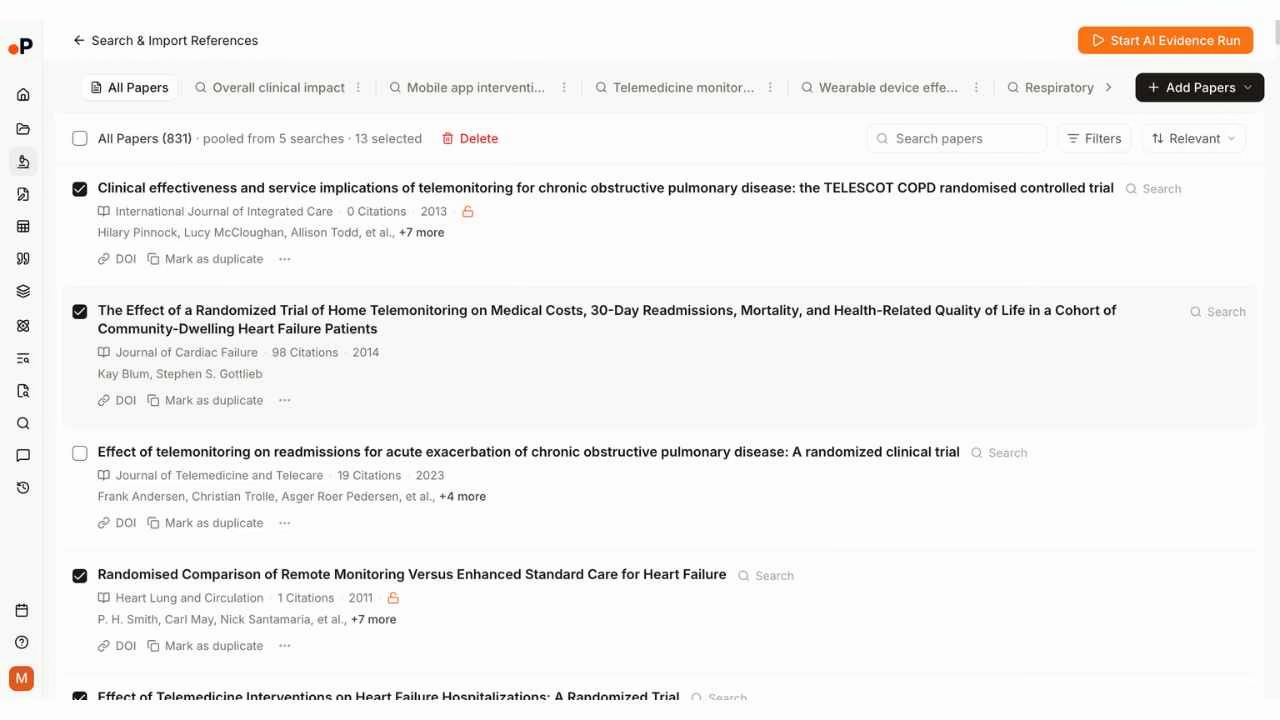
Rayyan requires researchers to conduct their searches externally in databases such as PubMed, Embase, CINAHL, or Scopus, export references as RIS, BibTeX, or CSV files, and then import those files into Rayyan for screening. The platform accepts imports from most major databases and reference managers, and the upload process is straightforward. However, the search strategy, the search results, and the screening decisions exist in different systems. There is no way to re-run a search from within Rayyan, no way to update results without a fresh export-import cycle, and no connection between the search outputs and the rest of the review pipeline.
For systematic review teams following Cochrane methodology, external database searching is standard practice. But for researchers who want their search results, screening decisions, extracted data, and final draft in one connected system, the import-only model adds friction at every stage.
Winner: Paperguide. Rayyan has no search capability. Paperguide's AI search across 200M+ papers with quality metrics and direct library integration is a structural advantage that compounds across every subsequent stage.
How Does Systematic Review Screening Compare?
Both platforms support systematic review screening, but they emphasize different aspects of the process.
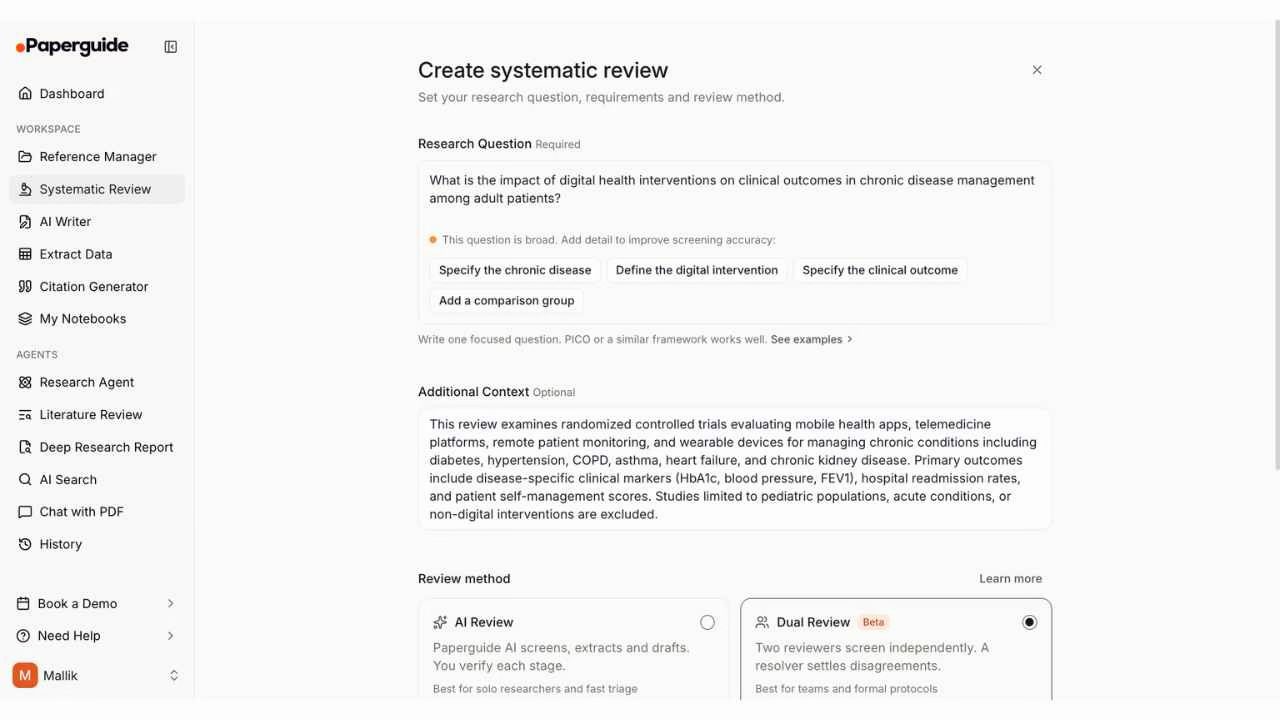
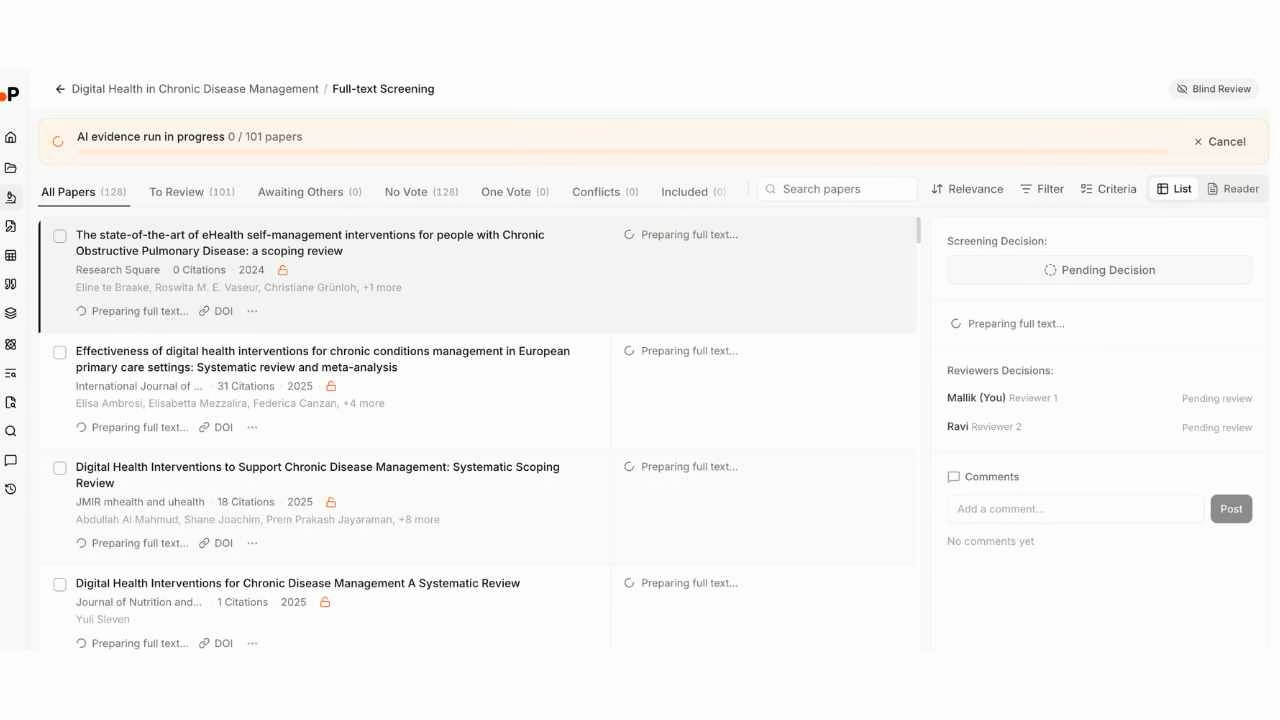
Paperguide offers two screening modes. The first is dual-blind review mode with lead-resolved conflicts: two independent reviewers screen each record without seeing each other's decisions until both have completed their assessment, and a third reviewer (the lead) resolves disagreements. This dual-blind approach follows Cochrane guidelines for minimizing bias. The second is AI-led screening with named verifier confirmation, designed for speed. In AI-led mode, the system performs an initial screening pass and a named human verifier confirms or overrides each decision. Both modes log every decision for auditability. Exclusion criteria are ordered and applied sequentially, so reviewers must select the specific reason for each exclusion. The PRISMA flow diagram updates automatically based on screening counts.
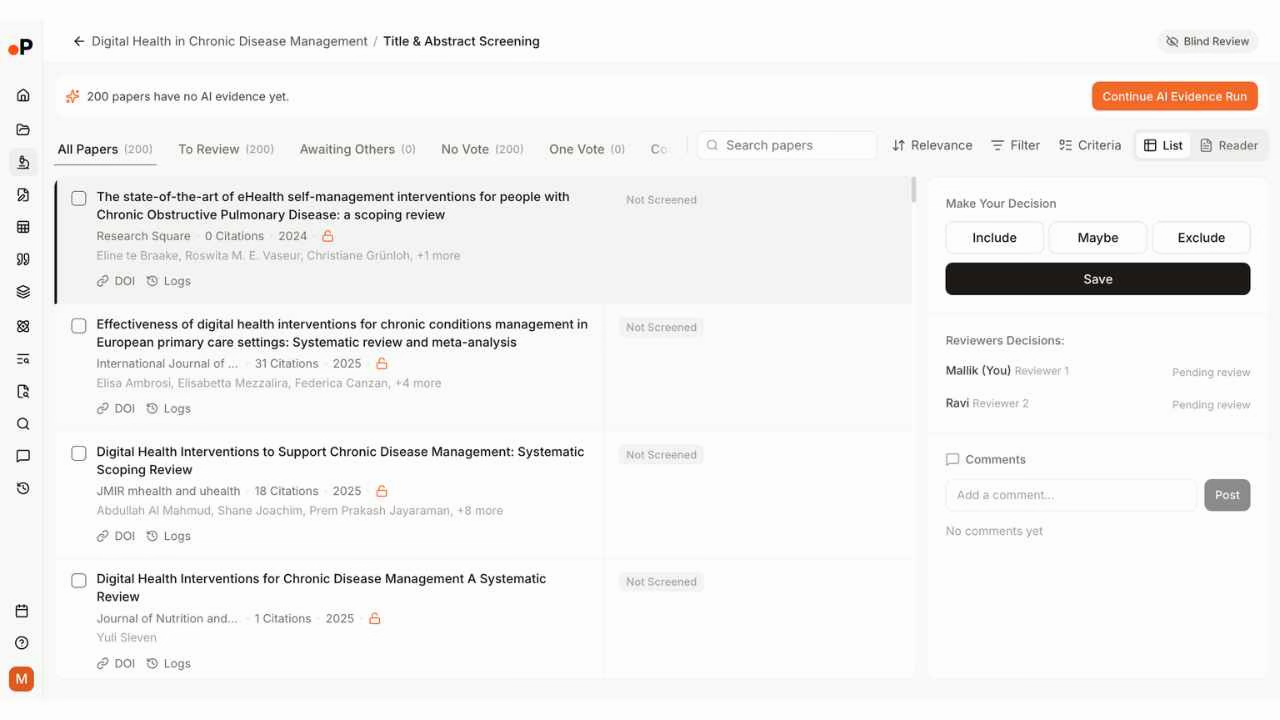
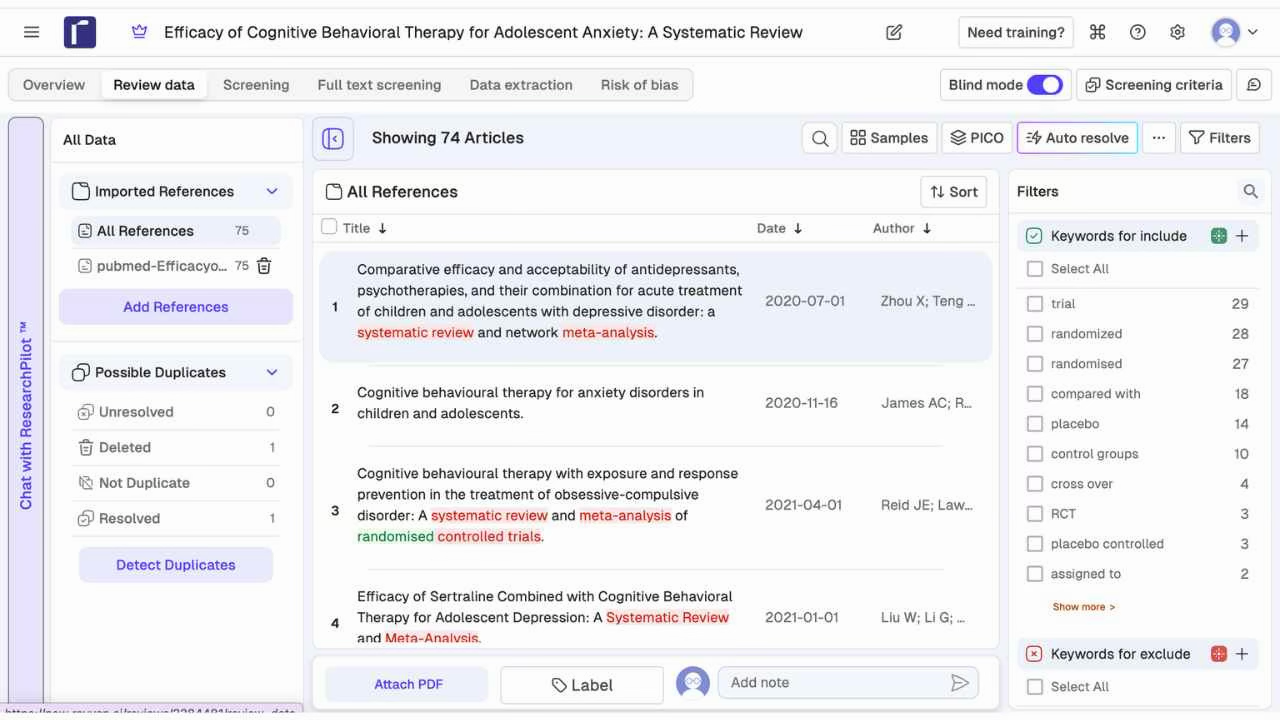
Rayyan provides a polished screening interface optimized for speed. Reviewers see the title, abstract, and source metadata, then vote Include, Maybe, or Exclude with color-coded buttons (green, yellow, red). Rayyan's signature feature is Blind mode, which hides other reviewers' decisions until the review owner turns Blind mode off. This prevents bias during screening. The platform uses AI relevance predictions to rank references by likely relevance, helping reviewers process the most promising records first. Keyword highlighting in abstracts uses color coding to flag terms associated with inclusion (green) or exclusion (red) criteria. The PICO button provides structured analysis of Population, Intervention, Comparison, and Outcome for each reference. Keyboard shortcuts and multi-select bulk actions accelerate high-volume screening.
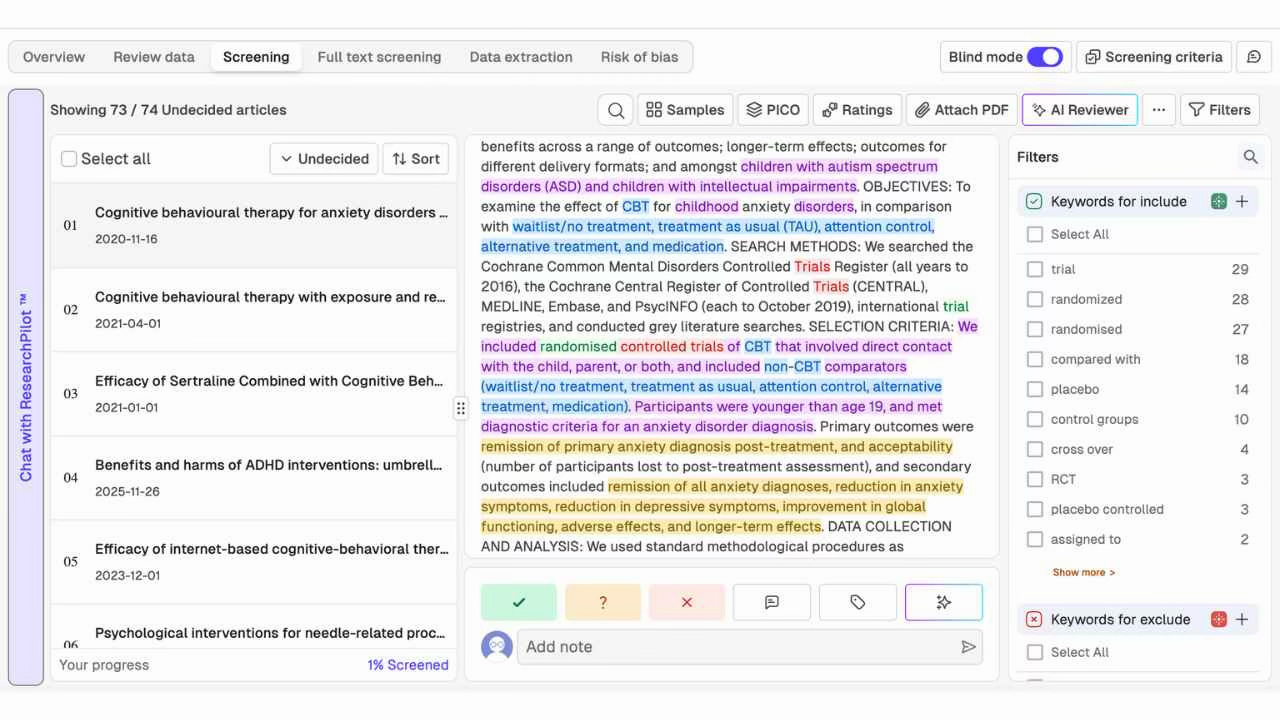
In practice, Rayyan's screening interface is more optimized for raw speed. The color-coded keyword highlighting, keyboard shortcuts, and AI relevance ranking are designed to help a reviewer process hundreds of abstracts per session. Paperguide's screening is deeper in terms of auditability, with true dual-blind review and lead-resolved conflicts providing a more rigorous conflict resolution workflow.
Winner: Tie with caveats. Rayyan's screening interface is faster for high-volume screening with AI relevance predictions, keyword highlighting, and keyboard shortcuts. Paperguide offers true dual-blind screening with lead-resolved conflicts (rather than Rayyan's Blind mode toggle that can be turned off by the review owner), plus an AI-led screening mode for teams that need the fastest turnaround with human verification. Teams prioritizing screening speed will prefer Rayyan. Teams prioritizing screening rigor and auditability will prefer Paperguide.
How Does AI-Assisted Screening Compare?
Both platforms use AI to accelerate screening, but their approaches differ significantly.
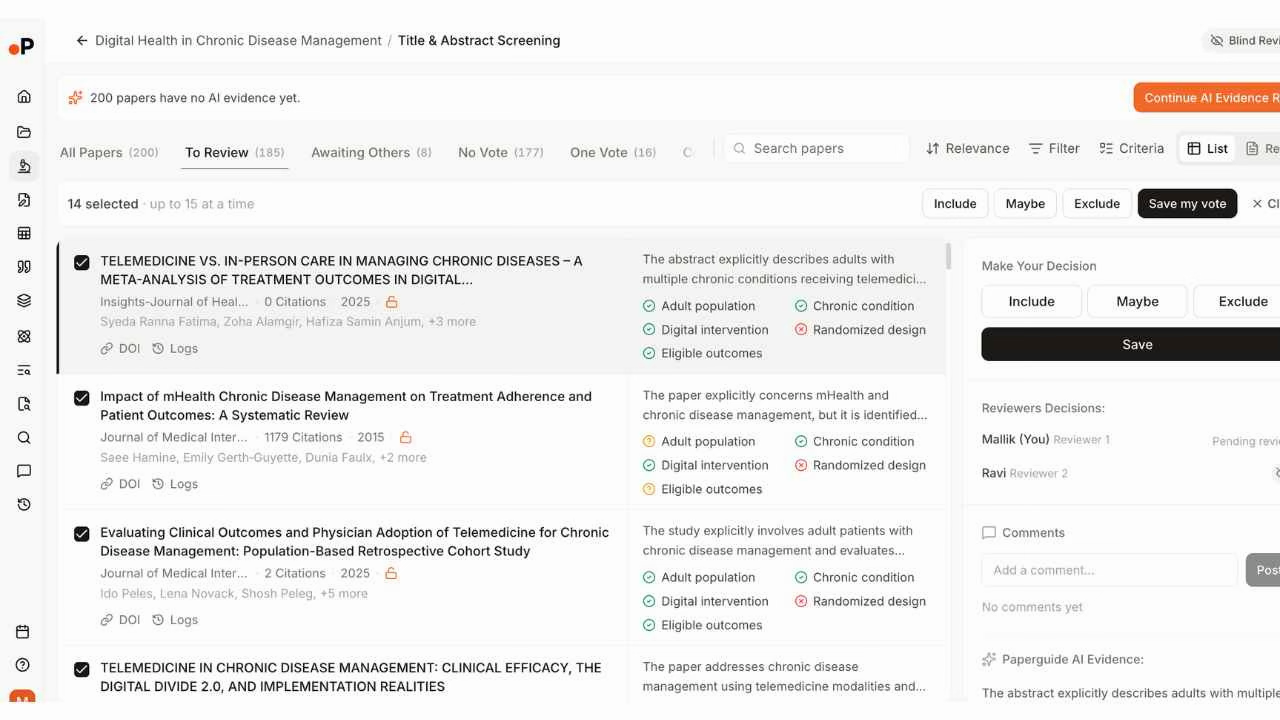
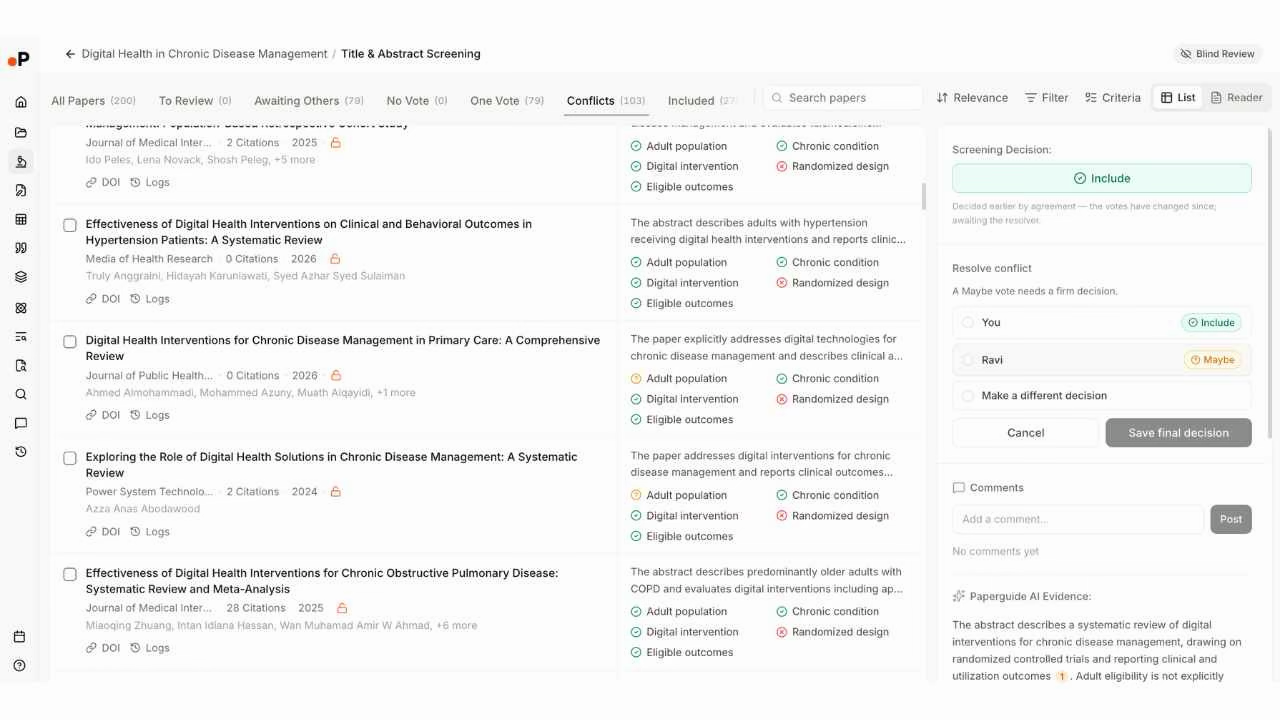
Paperguide provides an AI Evidence Run that evaluates every paper against the review's inclusion and exclusion criteria. The system checks each criterion individually and produces a visual assessment with green (met) and orange (not met) indicators. For a systematic review on digital health interventions, the AI Evidence Run assessed 200 papers against five criteria: Adult population, Chronic condition, Digital intervention, Randomized design, and Eligible outcomes. Reviewers can see exactly which criteria each paper meets or fails before making their screening decision. This criteria-based AI assessment preserves the reasoning chain, not just a relevance score.
Rayyan takes a different approach through its ResearchPilot suite (available on institutional plans). The AI Reviewer provides zero-shot relevance ratings that predict whether a reference is relevant to the review question. The platform also offers AI-assisted PICO data extraction and an AI Analyzer for deeper reference evaluation. On individual plans, AI relevance predictions rank references by likely relevance. The key difference is that Rayyan's AI produces a relevance score or prediction, while Paperguide's AI Evidence Run produces a per-criterion assessment.
For teams that need to understand why the AI recommended inclusion or exclusion, Paperguide's criteria-based assessment provides more transparent reasoning. For teams that need to quickly triage a large reference set by relevance probability, Rayyan's prediction-based ranking is efficient.
Winner: Paperguide for transparency, Rayyan for speed. Paperguide's per-criterion AI assessment shows exactly which inclusion criteria each paper meets, which supports audit trails and reproducibility. Rayyan's relevance predictions are faster for triaging large sets but provide less granular reasoning.
How Does Data Extraction Compare?
Both platforms support data extraction, but the scope and downstream utility differ.
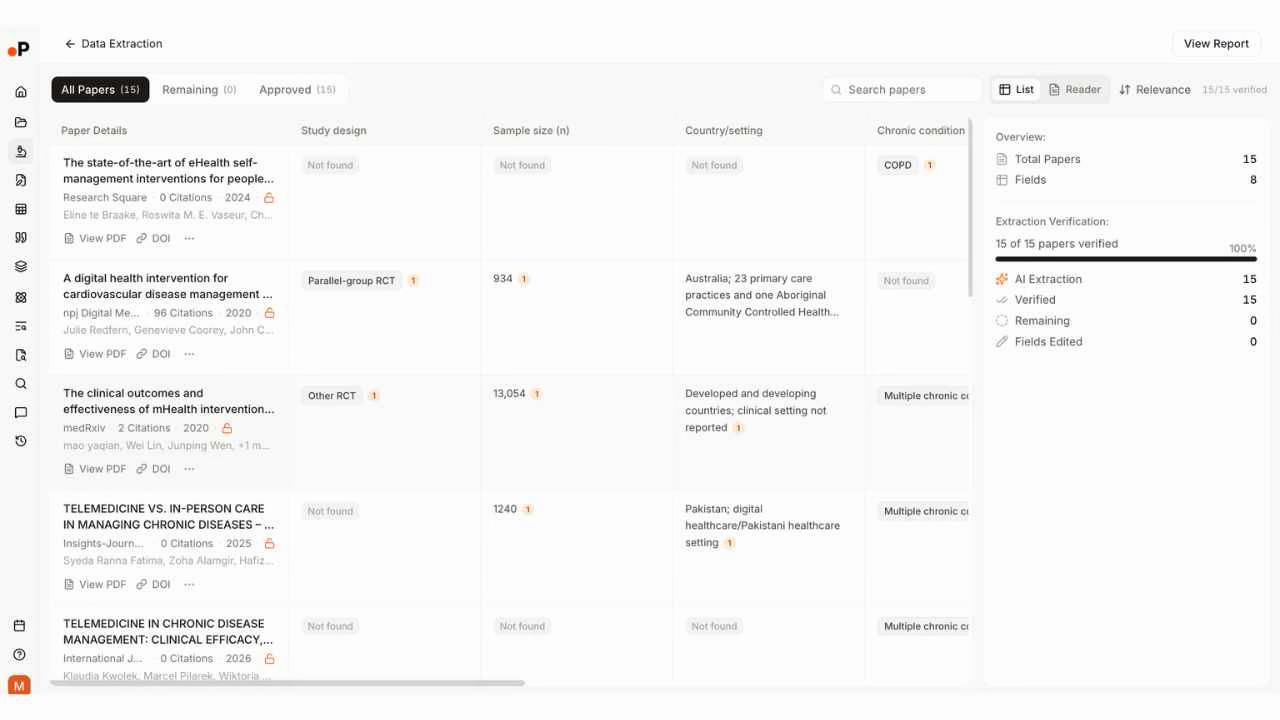
Paperguide provides data extraction workbooks with configurable columns. Users define extraction fields with specified output types (Answer, Yes/No, or specified options), and the platform provides sentence-level citation evidence on every extracted value. This means each data point links back to the exact passage in the source paper. Extraction tables can feed directly into the AI Paper Writer, so extracted evidence flows into a cited draft without manual copy-pasting.
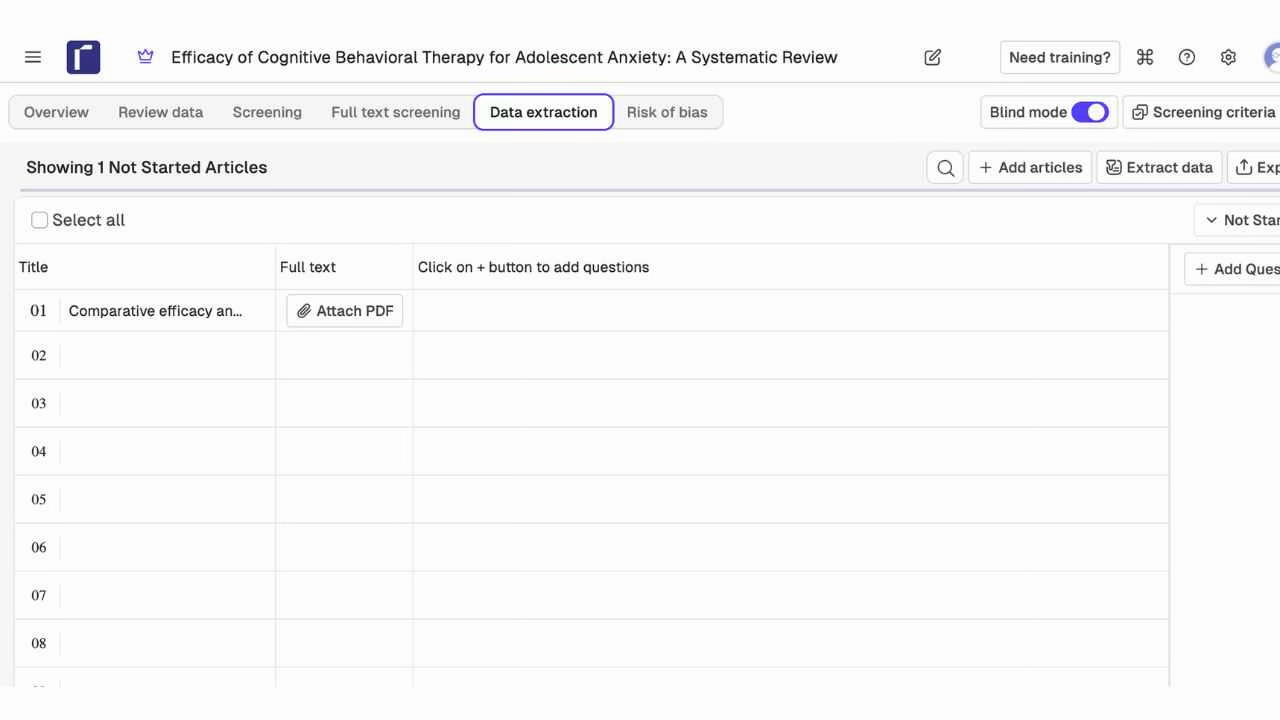
Rayyan offers data extraction as a spreadsheet-style interface where reviewers add custom questions as columns and extract data from each included study. The interface supports numbered rows and custom question types. On institutional plans with ResearchPilot, Auto-Extract Data uses AI to pre-populate extraction fields. The extraction output can be exported as CSV or Excel. However, Rayyan's extraction does not connect to a writing workspace, and there is no sentence-level evidence linking for extracted values.
The critical difference is what happens after extraction. In Rayyan, extracted data exports as a spreadsheet. The researcher then moves to a separate tool for writing. In Paperguide, extracted data feeds directly into the AI Paper Writer, where a cited draft can be generated from the same evidence base.
Winner: Paperguide. While both platforms support custom extraction fields, Paperguide's sentence-level evidence linking and extraction-to-writing pipeline provide significantly more downstream utility. Rayyan's extraction is functional but disconnected from writing.
How Does Risk of Bias Assessment Compare?
This is a category where Rayyan holds an advantage today.
Rayyan includes built-in risk of bias assessment with a tool selector that supports multiple assessment frameworks: RoB 2 for randomized trials, ROBINS-I for non-randomized studies, and the Newcastle-Ottawa Scale for observational studies. Each article can be assessed individually, with an overall risk column and the ability to export completed assessments.
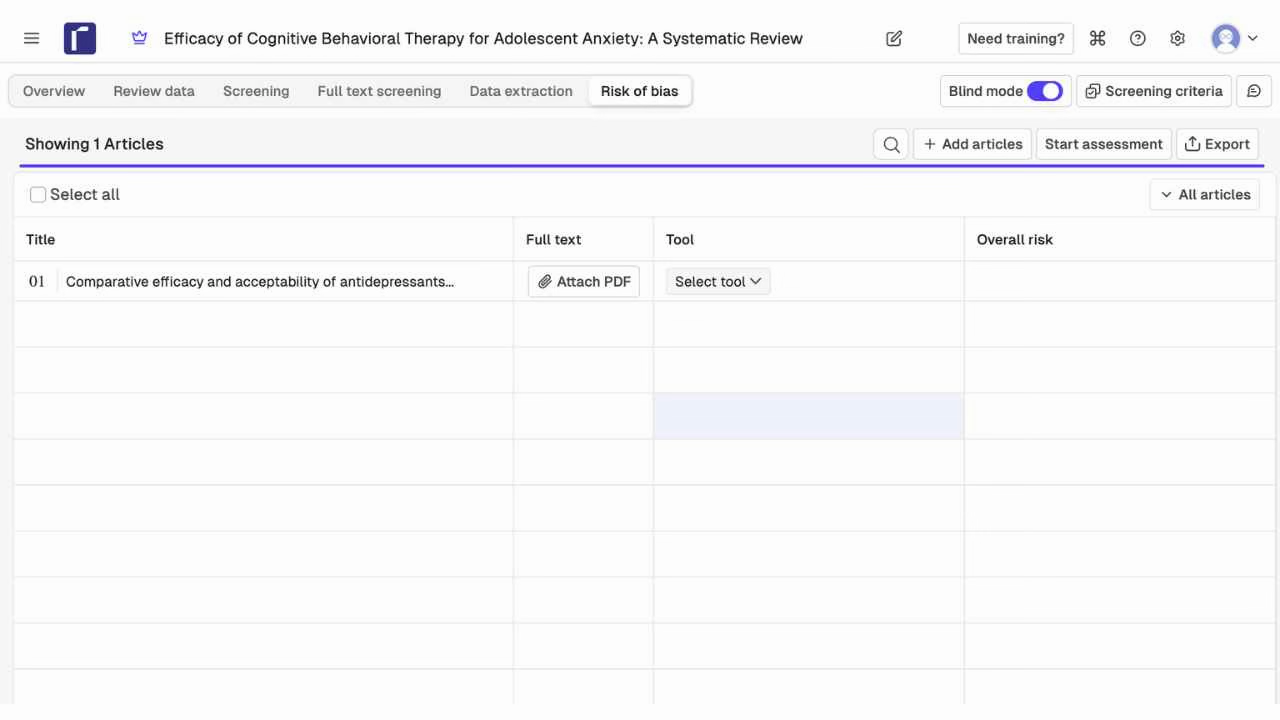
Paperguide does not currently offer dedicated risk of bias assessment tools. This capability is on the product roadmap. Researchers using Paperguide for systematic reviews that require formal quality assessment must currently perform this step in an external tool or manually within the extraction workbooks.
For systematic reviews submitted to Cochrane, required by regulatory bodies, or published in journals that mandate formal risk of bias reporting, this gap is meaningful.
Winner: Rayyan. Risk of bias assessment with multiple framework options (RoB 2, ROBINS-I, Newcastle-Ottawa) is a genuine strength. Paperguide's roadmap commitment is noted, but the feature is not available today.
How Does AI Writing Compare?
This comparison is straightforward because Rayyan does not have a writing workspace.
Paperguide includes an AI Paper Writer that generates citation-grounded drafts from the researcher's own evidence base. The writer supports '@' citation insertion (referencing papers from the library or extraction tables), over 1,000 citation styles, collaborative editing, and a plagiarism checker. The output is a structured document traceable to screened and extracted sources. For systematic review teams, this means the final report can be drafted inside the same platform where screening and extraction occurred.
Rayyan produces exported screening decisions, extraction tables, and risk of bias assessments. The output is designed to be downloaded and then written up in a separate tool such as Microsoft Word, Google Docs, or LaTeX. There is no in-platform writing workspace, no citation management during drafting, and no way to generate a written report from the screened evidence without leaving the platform.
For research teams whose deliverable is a written systematic review report (which is the case for the vast majority of reviews), Rayyan handles the screening and extraction stages. Writing the actual review document happens elsewhere.
Winner: Paperguide. Rayyan has no writing capability. Paperguide's AI Paper Writer with citation grounding, 1,000+ styles, and plagiarism checking fills a genuine gap in the systematic review workflow.
How Does Reference Management Compare?
Paperguide includes a full AI-native reference manager: DOI, URL, BibTeX, RIS, and PDF import, Zotero and Mendeley import, automatic metadata and open-access PDF retrieval, folders and tags, an in-app PDF reader with annotation and highlights, AI summaries, over 1,000 citation styles, and a Chrome extension for capturing references with institutional proxy access (EZproxy, OpenAthens). Every paper in the library is usable across search, extraction, review, and the AI Paper Writer.
Rayyan is not a reference manager. It accepts imported references from external databases or reference managers for the purpose of screening. Once references are imported for a review, they exist within that review's context. There is no persistent library across reviews, no citation style management, no annotation tools beyond screening labels, and no browser extension for capturing new references.
Researchers using Rayyan typically maintain a separate reference manager (Zotero, Mendeley, or EndNote) alongside it. This means citations, PDFs, and annotations live in one system while screening decisions and extracted data live in another.
Winner: Paperguide. Rayyan has no reference management. Paperguide's built-in reference manager eliminates the need for a separate tool and keeps citations connected to every research workflow.
How Does Collaboration Compare?
Paperguide supports projects and workspaces with role-based access control. Review teams can collaborate across all stages of the workflow, from search through extraction to writing. Dual-blind screening ensures reviewer independence with lead-resolved conflict resolution. The platform tracks reviewer progress with Cohen's Kappa inter-rater agreement metrics and individual reviewer statistics.
Rayyan is designed for team screening at scale. Each plan includes a set number of "free reviewers" who can participate without their own paid account. The free plan allows 2 free reviewers, Essential allows 5, Advanced allows 10, and Business/Academic allows 250. Blind mode prevents reviewers from seeing each other's decisions during screening. The platform supports bulk actions, workload sampling for dividing references among team members, and an auto-resolve feature for duplicates. A mobile app allows reviewers to screen on the go.
Rayyan's free reviewer model is a genuine strength for large teams. A Business/Academic plan with 250 free reviewers means a large Cochrane review group can invite all team members without per-seat costs for screeners.
Winner: Rayyan for large screening teams, Paperguide for full-workflow collaboration. Rayyan's free reviewer model and mobile app are better for teams whose primary collaboration need is high-volume screening. Paperguide's collaboration spans the full workflow from search to writing with deeper auditability features.
How Does PRISMA Reporting Compare?
Both platforms generate PRISMA flow diagrams, but with different levels of integration.
Paperguide generates PRISMA 2020 flow diagrams directly from the review data. The diagram updates automatically as screening progresses, showing the full flow from identification through screening to inclusion. The PRISMA flow appears in the generated systematic review report and is available as a downloadable diagram. In our test, the flow showed: 936 identified from Paperguide Search, 736 removed, 200 screened, 72 excluded, 128 full texts sought, 102 not retrieved, 26 assessed for eligibility, 11 excluded by criteria, and 15 included in the final review.
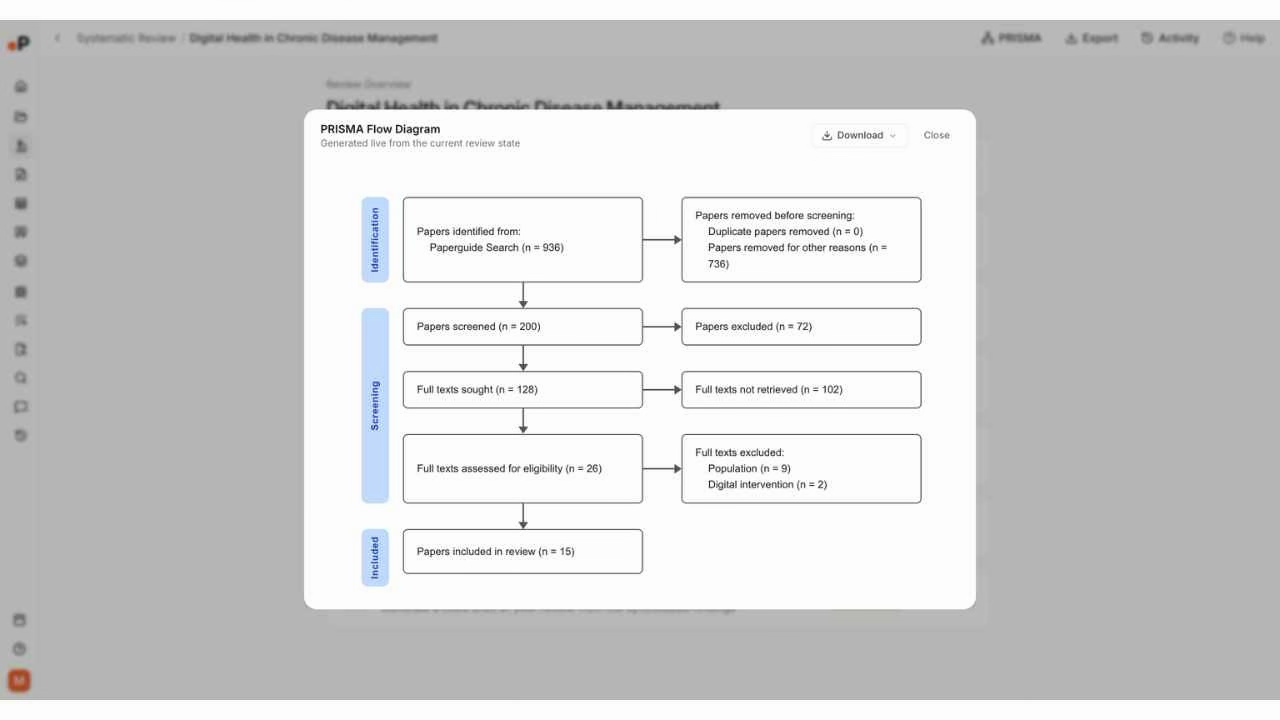
Rayyan also generates PRISMA flow diagrams from the review data. The PRISMA button is accessible from the review overview, and the diagram reflects the current state of screening. However, Rayyan's PRISMA flow covers the screening stages that occur within the platform. Since Rayyan does not handle search, the identification stage must be documented separately.
Winner: Paperguide. Both generate PRISMA diagrams, but Paperguide's flow covers the complete review from search through inclusion because the search stage also occurs within the platform. Rayyan's PRISMA diagram requires external documentation for the identification stage.

Where Is Paperguide Stronger Than Rayyan?
Beyond the feature-by-feature comparisons above, Paperguide has five structural advantages that compound across a full systematic review project.
1. Workflow Completeness
Rayyan covers screening, basic data extraction, and risk of bias assessment. The workflow begins when references are imported and ends when data is exported. Paperguide covers search, screening, extraction, PRISMA, writing, and reference management. Context carries across stages instead of being exported between tools. In practical terms, Rayyan replaces your screening spreadsheet. Paperguide replaces your search, your screening spreadsheet, your reference manager, and your draft.
2. AI-Powered Search Integration
Rayyan has no search capability. Researchers must search external databases, export results, and import them. Paperguide's AI search across 200M+ papers with SJR and SNIP quality metrics means the first stage of a systematic review (identifying potentially relevant records) happens inside the platform. Saved searches are reproducible, and results flow directly into screening.
3. True Dual-Blind Screening
Rayyan's Blind mode hides reviewer decisions but the review owner can toggle Blind mode off at any time. Paperguide's dual-blind review mode enforces independent screening with lead-resolved conflicts: reviewers cannot see each other's decisions until both have completed their assessment, and a designated lead resolves disagreements. This provides stronger methodological rigor for formal systematic reviews.
4. AI Evidence Run with Criteria Assessment
Rayyan's AI produces relevance predictions (a probability score). Paperguide's AI Evidence Run evaluates each paper against the review's specific inclusion and exclusion criteria, producing a per-criterion visual assessment. This transparency supports audit trails and makes it clear exactly why the AI suggested inclusion or exclusion.
5. Citation-Grounded Writing
Rayyan produces exported screening data. Writing the actual review document happens elsewhere. Paperguide's AI Paper Writer generates citation-grounded drafts directly from screened and extracted evidence, with '@' citation insertion, over 1,000 citation styles, collaborative editing, and a plagiarism checker. This eliminates the manual step of transferring evidence from one platform to a writing tool.
Where Does Rayyan Genuinely Win?
1. Screening Speed and Interface Polish
Rayyan's screening interface is optimized for speed. Color-coded keyword highlighting (green for inclusion terms, red for exclusion terms) in abstracts, keyboard shortcuts, bulk select, and AI relevance ranking are all designed to help reviewers process large volumes of references quickly. For teams screening 5,000+ references, Rayyan's interface ergonomics can save meaningful time per session.
2. Risk of Bias Assessment
Rayyan provides built-in risk of bias assessment with multiple framework options: RoB 2 for randomized trials, ROBINS-I for non-randomized studies, and the Newcastle-Ottawa Scale for observational studies. Paperguide does not yet offer this feature. For reviews requiring formal quality assessment, Rayyan handles this step in-platform.
3. Generous Free Tier
Rayyan's free plan allows 3 active reviews with 2 free reviewers, AI relevance predictions, duplicate detection, and 15+ workbench facets. This is sufficient for a student or early-career researcher running a small review. Paperguide's free plan provides 1,000 AI credits and 20 AI searches per month, which covers basic usage but may not cover a full systematic review workflow.
4. Mobile Screening App
Rayyan offers a dedicated mobile app that allows reviewers to screen abstracts on their phone. This is genuinely useful for reviewers who want to process records during commutes, between meetings, or away from their desk. Paperguide does not have a dedicated mobile screening app.
5. Free Reviewer Model for Large Teams
Rayyan's plan structure includes free reviewer seats (2 on Free, 5 on Essential, 10 on Advanced, 250 on Business/Academic). This means invited reviewers can screen without their own paid account. For large Cochrane review groups or institutional teams with many screeners, this model reduces per-person costs significantly.
Paperguide vs Rayyan: Pricing Comparison
| Paperguide | Rayyan | |
|---|---|---|
| Free tier | Free plan with 1,000 AI credits/month | 3 active reviews, 2 free reviewers |
| Entry paid plan | Plus: $17/month ($204/year) | Essential: $4.99/seat/month ($59.88/year) |
| Mid-range plan | Pro: $39/month ($468/year) | Advanced: $8.33/seat/month ($99.96/year) |
| Advanced plan | Evidence: $119/month ($1,428/year) | Business/Academic: $41.67/license/month (min 5 licenses, $2,500/year) |
| Enterprise | Custom | Custom |
| Free reviewers included | Per-seat collaboration | 2 (Free), 5 (Essential), 10 (Advanced), 250 (Business) |
| Includes search | Yes (200M+ papers) | No |
| Includes writing | Yes (AI Paper Writer) | No |
| Includes reference manager | Yes | No |
| Risk of bias | On roadmap | Built-in (RoB 2, ROBINS-I, NOS) |
The pricing comparison reveals a structural difference in what you get at each price point. Rayyan's Essential plan at $59.88/year is cheaper than Paperguide Plus at $204/year, but Rayyan Essential provides only screening with 5 free reviewers. Paperguide Plus includes AI search across 200M+ papers, systematic review with dual-blind screening, data extraction, AI Paper Writer, Literature Review AI, and a full reference manager.
For a researcher who needs only screening, Rayyan's lower entry price makes sense. For a researcher who currently pays separately for a screening tool, a reference manager, and a writing tool, Paperguide consolidates all three at a lower combined cost.
For institutional teams, Rayyan's Business/Academic plan at $2,500/year (minimum 5 licenses) with 250 free reviewers is competitive for large teams running many reviews. Paperguide's Evidence plan at $1,428/year provides the full workflow with enterprise features for smaller teams.
Final Verdict: Should You Choose Paperguide or Rayyan?
Choose Paperguide if:
- You need a connected research workflow from search through systematic review to a cited draft in one platform.
- You want AI-powered search across 200M+ papers with SJR and SNIP quality metrics integrated into your review workflow.
- You need AI-led screening with criteria-based assessment alongside traditional dual-blind screening.
- You write within your research platform and need citation management, plagiarism checking, and over 1,000 citation styles.
- You are an independent researcher or small team who needs more capability per dollar than a screening-only tool provides.
Choose Rayyan if:
- Screening speed is your primary bottleneck and you need the fastest interface with keyboard shortcuts, keyword highlighting, and AI relevance predictions.
- You need a generous free plan for basic reviews or a free reviewer model for large screening teams.
- You need built-in risk of bias assessment with multiple framework options.
- You prefer to screen on mobile and need a dedicated app.
- Your team uses separate, specialized tools for search (PubMed), reference management (Zotero), and writing (Word) and you only need a screening platform in between.
Overall, Paperguide is the stronger choice for researchers who need the full systematic review pipeline from paper discovery through screening and extraction to a publication-ready draft in one workspace. Among the AI tools for systematic review available in 2026, Paperguide is the only platform that spans search, dual-blind screening, extraction, writing, and reference management in one workspace, making it a strong contender as the Paperguide Systematic Review Software for teams that need workflow completeness. Rayyan remains the stronger choice for teams that need the fastest possible screening at scale, institutional free reviewer models, and built-in risk of bias tools, and are comfortable handling search and writing in separate systems.
Frequently Asked Questions
Is Paperguide better than Rayyan?
Paperguide is better for researchers who need a connected workflow from search through systematic review to a cited draft, with AI-powered search across 200M+ papers, SJR/SNIP quality metrics, dual-blind screening, AI Evidence Run with criteria assessment, citation-grounded writing, and a built-in reference manager. Rayyan is better for teams that need the fastest screening interface with AI relevance predictions, risk of bias assessment, and a generous free tier. The right choice depends on whether you need the full research pipeline or screening speed.
Is Paperguide a good Rayyan alternative?
Paperguide is a strong Rayyan alternative for researchers who want one platform connecting search, systematic review, literature review, extraction, references, and citation-grounded writing. It covers more of the research workflow and offers true dual-blind screening with lead-resolved conflicts. However, Rayyan's screening interface is faster for high-volume abstract processing, and Rayyan offers risk of bias tools that Paperguide does not yet provide.
Which tool has better AI features?
Both platforms use AI differently. Paperguide's AI Evidence Run evaluates papers against specific inclusion criteria with per-criterion visual feedback, and its AI Paper Writer generates citation-grounded drafts. Rayyan's ResearchPilot suite (institutional plans) includes AI Reviewer, zero-shot relevance ratings, and auto-data extraction. Paperguide's AI is more workflow-integrated (search through writing). Rayyan's AI is more screening-focused (relevance prediction and prioritization).
Which tool is better for PhD students?
Both have viable options. Rayyan's free plan with 3 active reviews and 2 free reviewers is sufficient for a student running a small systematic review. Paperguide Plus at $204/year covers AI search, systematic review, literature review, AI Paper Writer with 1,000+ citation styles, and reference management. For PhD students who need only screening, Rayyan's free tier works. For PhD students who need the full research workflow in one tool, Paperguide provides more value.
Does Rayyan have AI search?
Rayyan does not have a built-in search engine. Researchers must conduct their searches in external databases (PubMed, Embase, CINAHL, Scopus), export reference files, and import them into Rayyan for screening. Paperguide searches 200M+ papers across PubMed, arXiv, OpenAlex, and Semantic Scholar directly within the platform, with results flowing into screening without a manual export-import step.
Does Rayyan have an AI writing tool?
Rayyan does not have a writing workspace. It produces exported screening decisions, extraction tables, and risk of bias assessments that can be downloaded. Researchers must write the actual systematic review document in a separate tool. Paperguide's AI Paper Writer generates citation-grounded drafts directly from screened and extracted evidence with '@' citation insertion, over 1,000 citation styles, collaborative editing, and a plagiarism checker.
Can I use Paperguide and Rayyan together?
Some researchers use Rayyan for initial high-volume screening with AI relevance predictions, then import included references into Paperguide via BibTeX or RIS for extraction, writing, and reference management. This workflow captures Rayyan's screening speed and Paperguide's writing and reference management capabilities. However, screening decisions and reviewer assignments do not transfer automatically between platforms.
References
- Borah, R., Brown, A. W., Capers, P. L., & Kaiser, K. A. (2017). Analysis of the time and workers needed to conduct systematic reviews of medical interventions using data from the PROSPERO registry. BMJ Open, 7(2), e012545. https://doi.org/10.1136/bmjopen-2016-012545
- Abogunrin, S., Muir, J. M., Zerbini, C., & Sarri, G. (2025). How much can we save by applying artificial intelligence in evidence synthesis? Results from a pragmatic review to quantify workload efficiencies and cost savings. Frontiers in Pharmacology, 16, 1454245. https://doi.org/10.3389/fphar.2025.1454245
- Silva, J. J. S., Fernandez, S., Rosillo, N., & Bueno, H. (2026). Which systematic review software works best? A practical comparison. Journal of the Medical Library Association, 114(1), 83-85. https://doi.org/10.5195/jmla.2026.2262